Introduction to Etropo
Etropo is a specialized marketing budget management platform designed to replace spreadsheets with purpose-built software that makes planning, tracking, and adjusting marketing spend dramatically more efficient and collaborative.
The Problem Etropo Solves
Marketing teams face unique budget management challenges that spreadsheets weren’t designed to handle:
- Fragmented data - Spend data scattered across Google Ads, LinkedIn Ads, invoices, and manual entries
- Time-consuming updates - Hours spent copying data from platforms into spreadsheets each month
- Limited collaboration - Email attachments, version conflicts, and lack of real-time access
- No audit trail - Can’t see who changed what, when, or why
- Access control headaches - Hard to share budgets without exposing confidential data
- Disconnected approvals - Budget approval workflows managed in email or Slack
- Manual variance tracking - Comparing planned vs. actual spend requires constant formula updates
Etropo solves these problems with a platform built specifically for marketing budget workflows.
Core Capabilities
1. Intelligent Budget Planning
Hierarchical Budget Structure
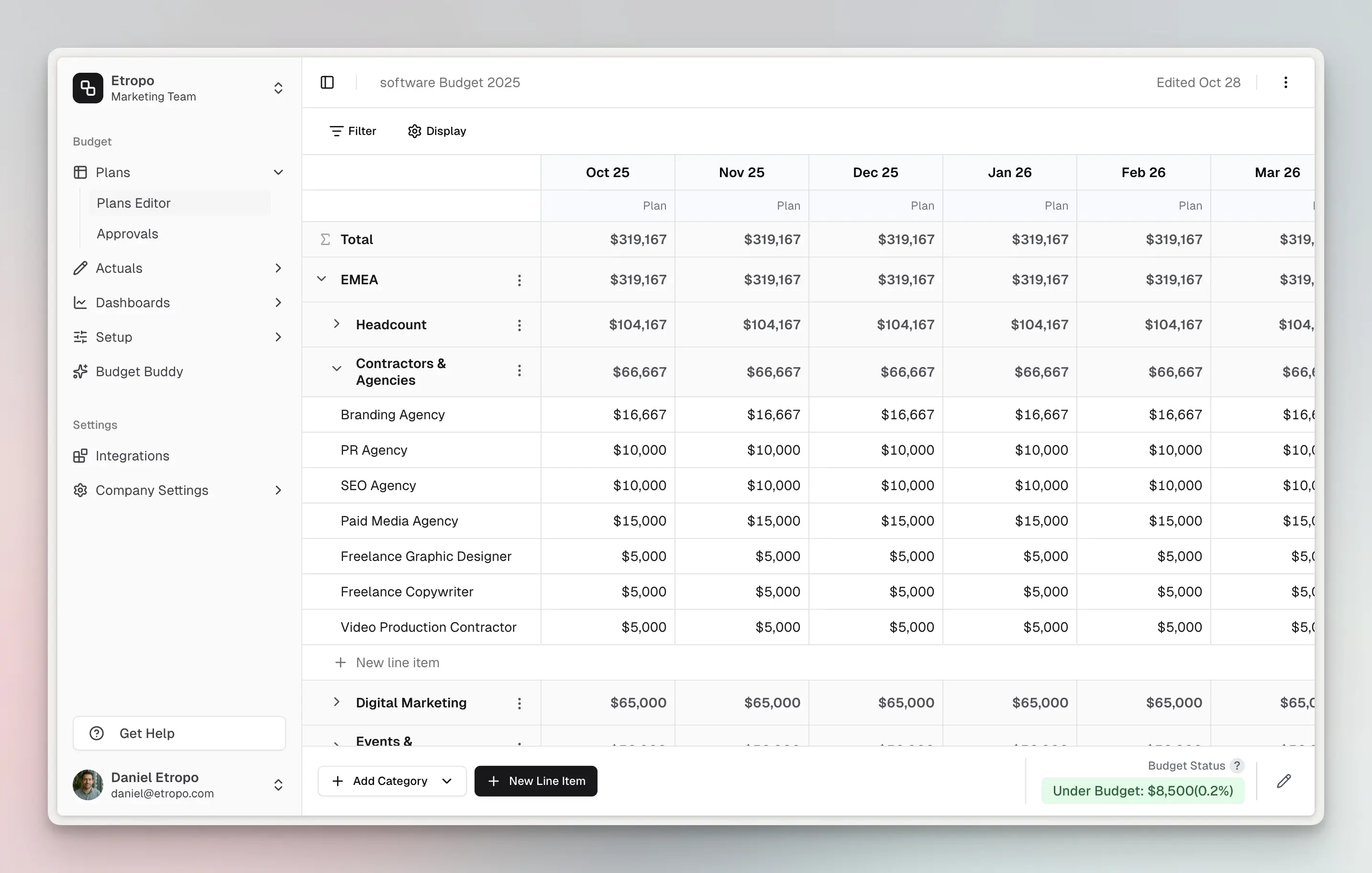
Create budgets organized by categories and line items with optional master category groupings for complex organizational structures:
- Master Categories - Group related categories under collapsible parent categories (e.g., “Digital Marketing” containing “Paid Search,” “Social Media,” “Display Advertising”)
- Categories - Organize spend by channel, campaign type, or function
- Line Items - Individual budget entries with planned amounts by month
- Cost Centers - Track departmental or functional allocations
- Custom Properties - Add custom fields (text, numbers, dropdowns) to categorize spend your way
Example budget hierarchy:
Marketing Budget 2025
├── Digital Marketing (Master Category)
│   ├── Paid Search
│   │   ├── Google Ads - Brand Keywords
│   │   ├── Google Ads - Non-Brand
│   │   └── Microsoft Ads
│   ├── Social Media
│   │   ├── LinkedIn Ads
│   │   ├── Facebook Ads
│   │   └── Twitter Ads
│   └── Display Advertising
├── Content Marketing (Master Category)
│   ├── Blog & SEO
│   └── Video Production
└── Events & Sponsorships (Master Category)
Multi-Currency Support
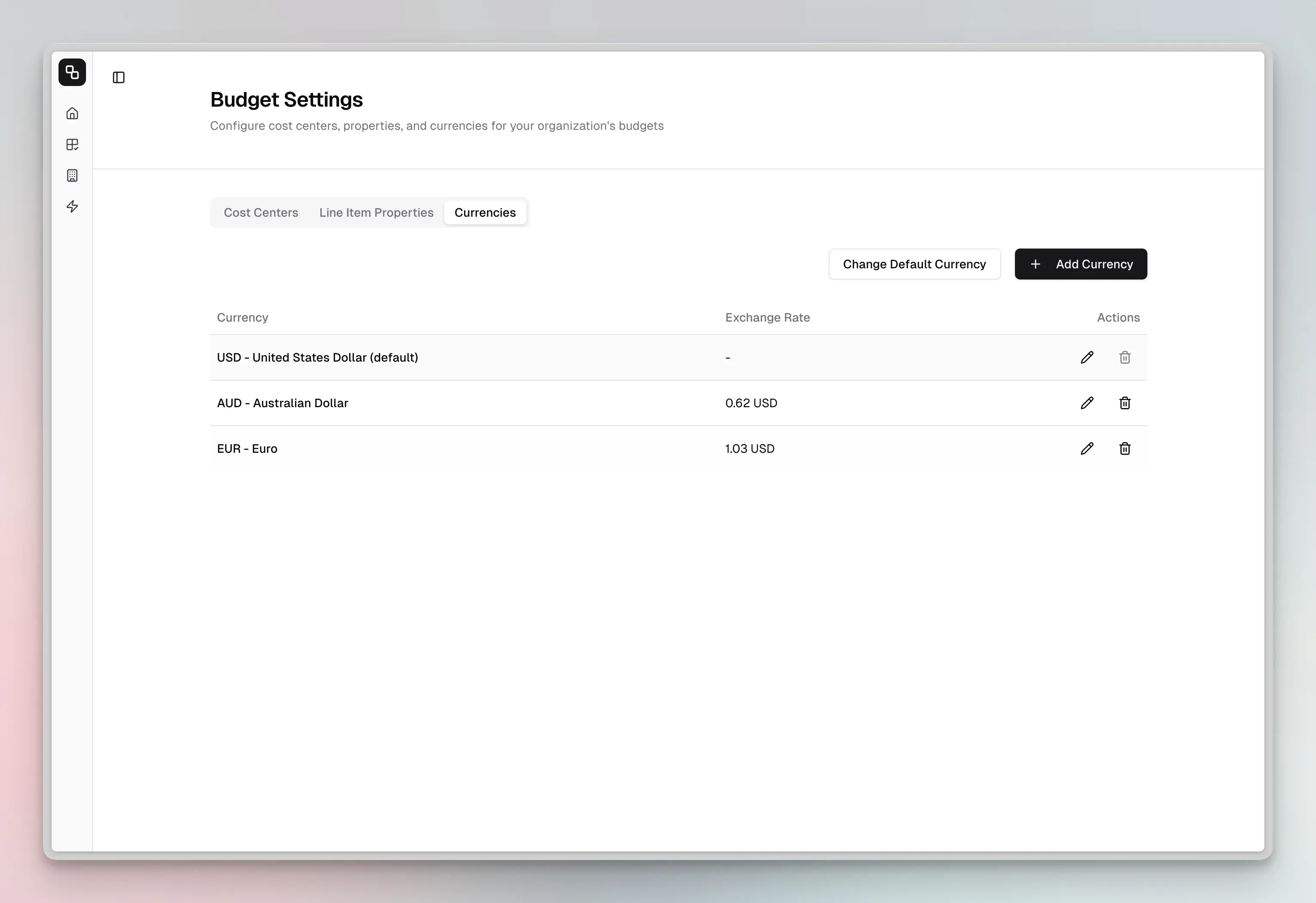
Operate globally with native multi-currency capabilities:
- Set organizational default currency
- Assign different currencies to individual line items
- Automatic exchange rate tracking and conversion
- Variance calculations normalize across currencies
Collaborative Budget Building
- Single source of truth - All marketing team members access the same budget in real-time, eliminating version conflicts and ensuring CMOs have complete visibility into team planning
- Category-level access control - Grant specific team members access to relevant categories
- Line item owners - Assign responsible parties for each budget line
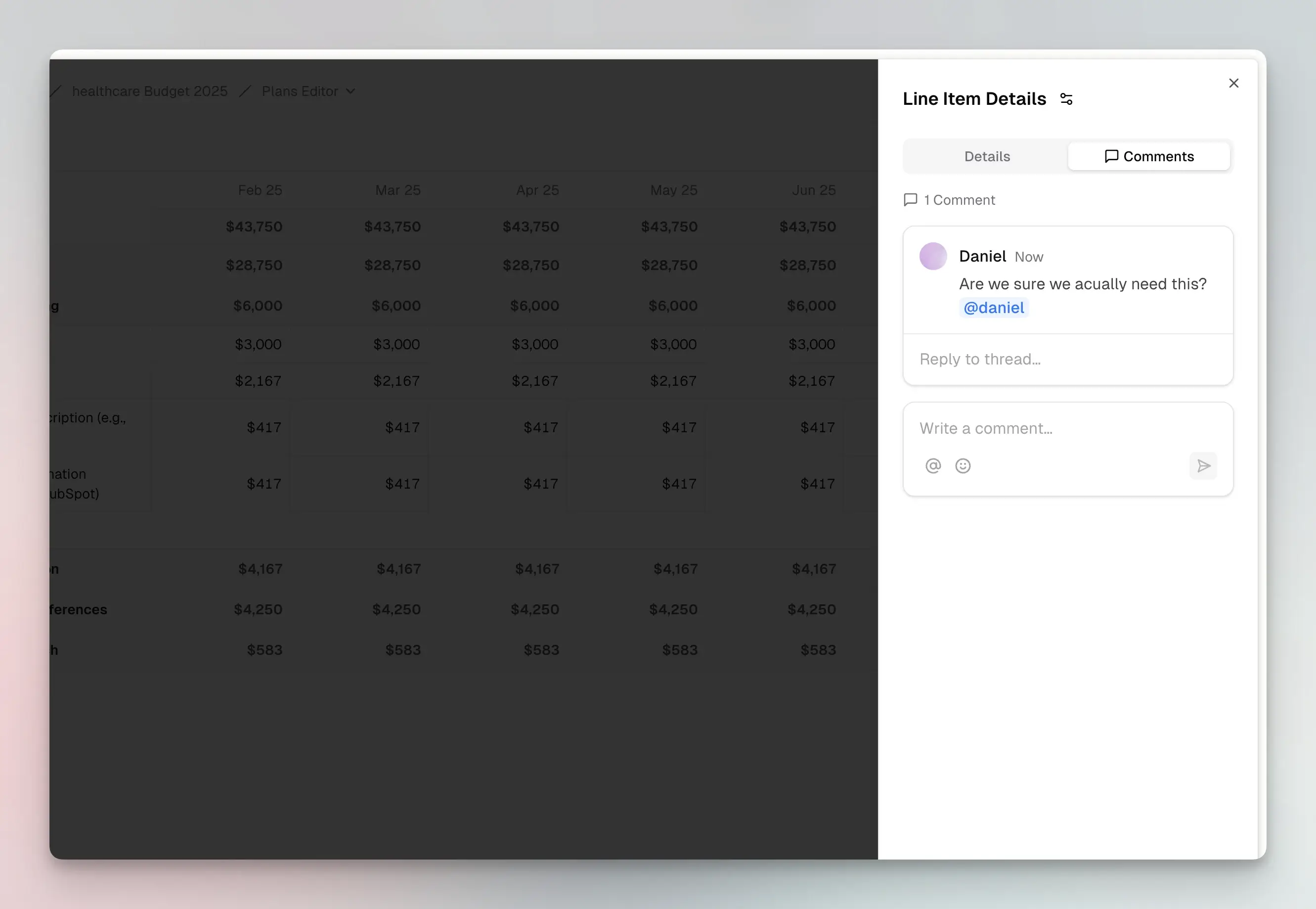
- Comments & discussions - Threaded comments on any line item
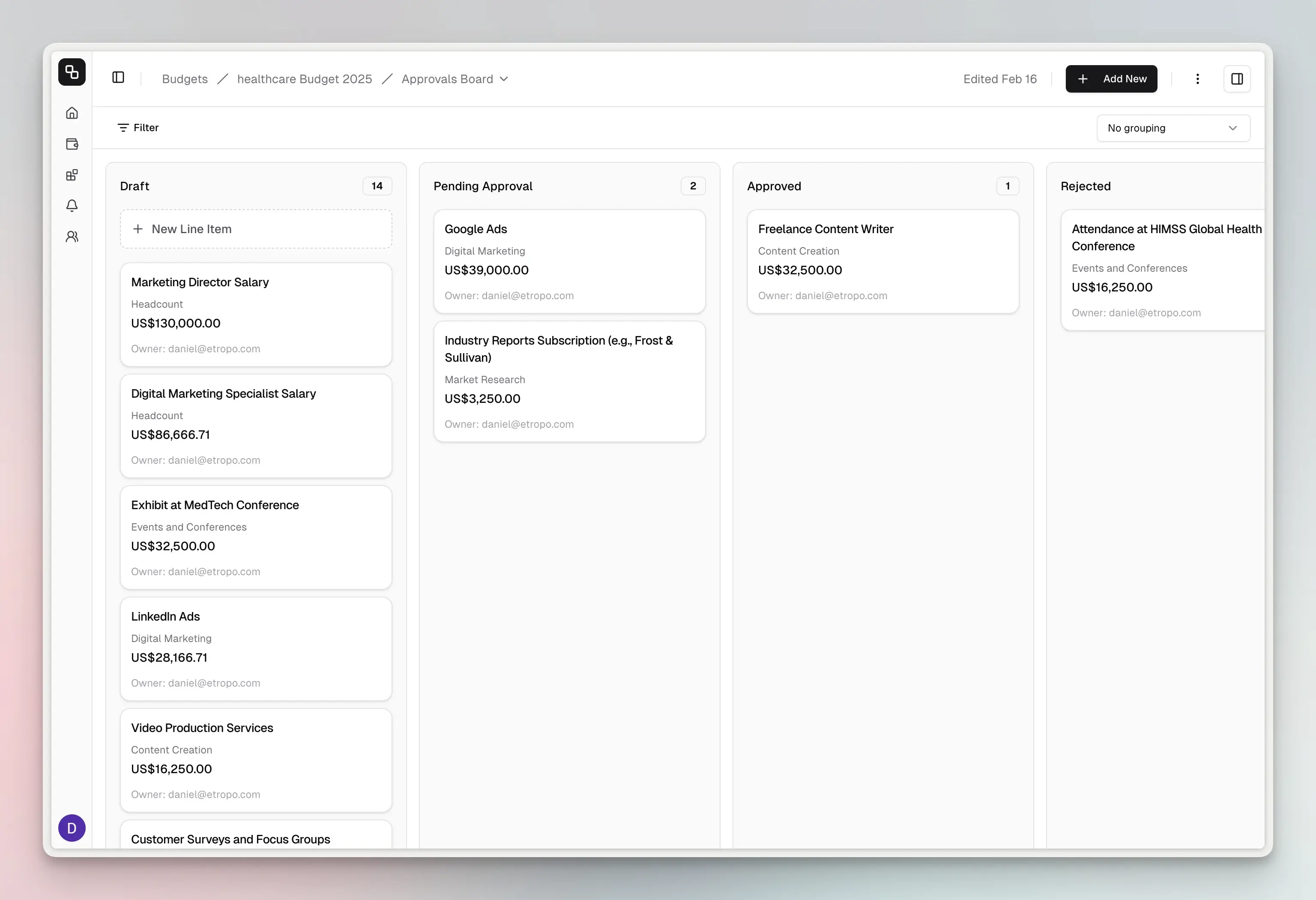
- Visual approval workflows - Drag-and-drop kanban board to move line items through Draft, Pending Approval, Approved, and Rejected statuses
2. Automated Spend Tracking
Spend Data Integration
Automatically sync actual spend from your marketing platforms:
- Google Ads & LinkedIn Ads - Weekly OAuth sync with multiple account support and up to 12 months historical import
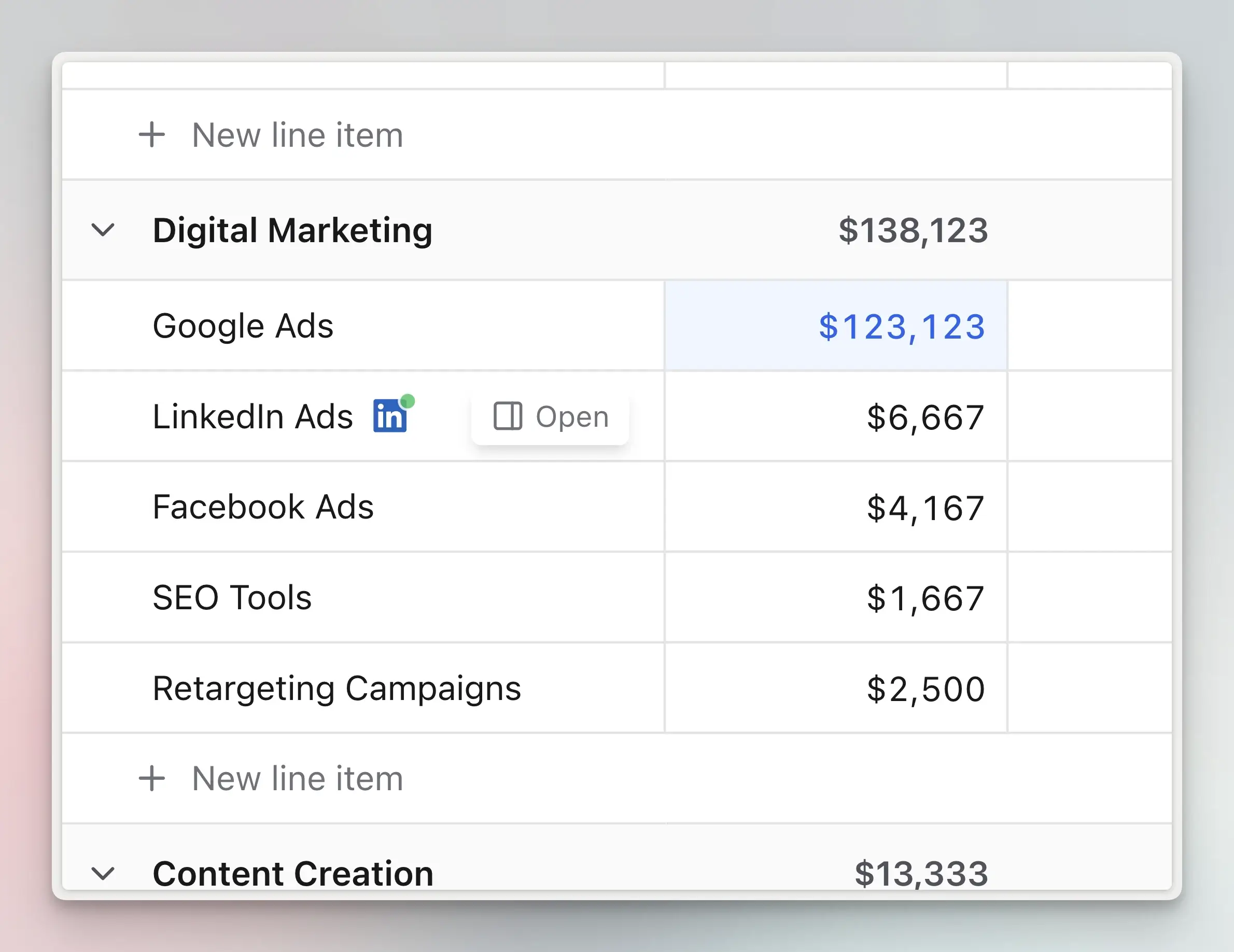
- Google Sheets - Daily two-way sync for Finance team collaboration
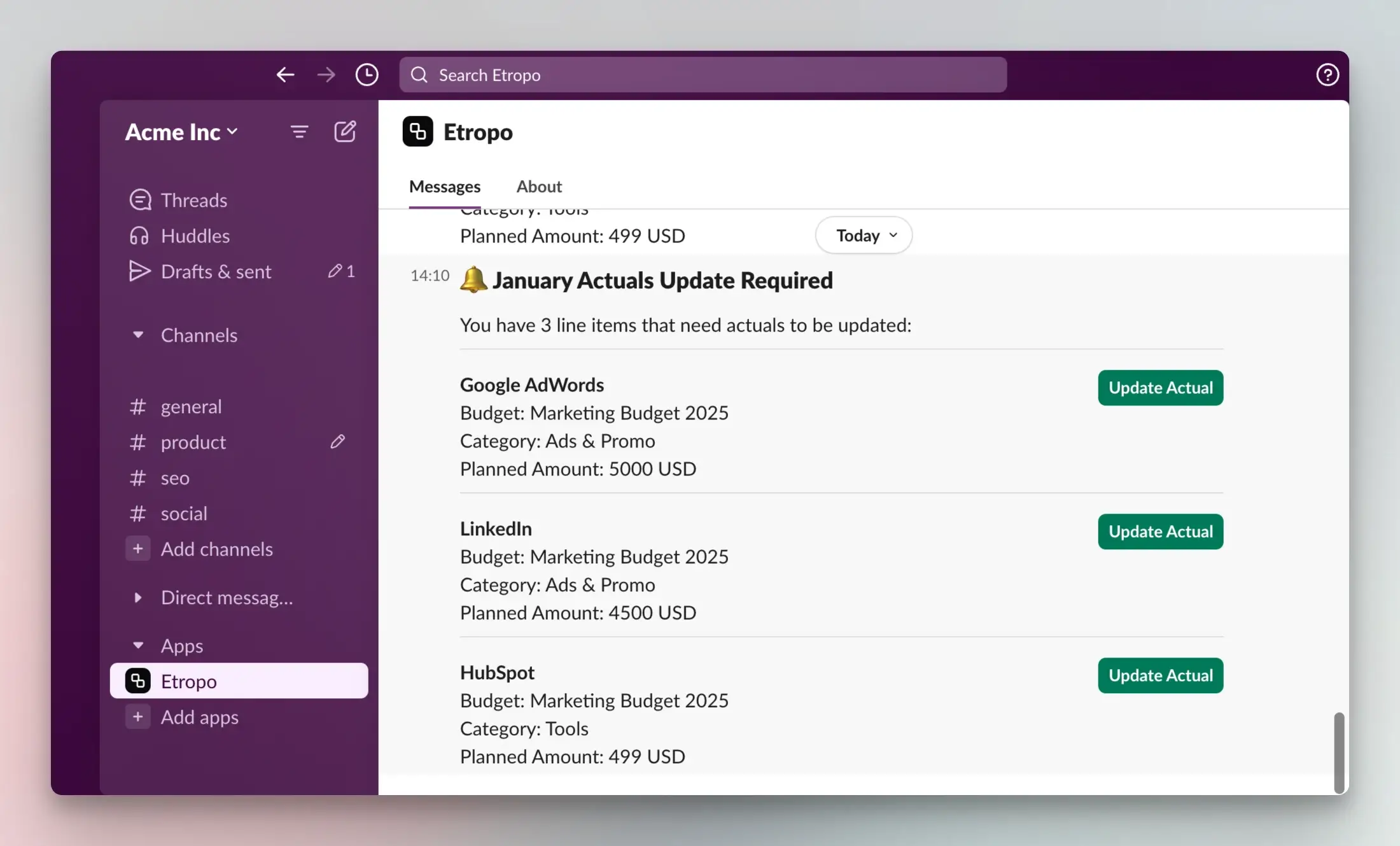
- Slack - Monthly reminders and one-click actual entry
Invoice Automation
Two ways to process invoices with AI-powered extraction:
- Email forwarding - Forward vendor invoices to your unique email address
- Manual upload - Upload up to 10 PDF invoices directly from the interface
AI extracts amounts, dates, and descriptions automatically. Review and confirm in seconds - no manual data entry.
Manual Actuals Entry
For spend not tracked by integrations:
- Excel-like grid interface - Familiar spreadsheet experience with keyboard shortcuts
- Range selection - Select multiple cells at once (Cmd/Ctrl+click, Shift+select)
- Bulk updates - Update multiple months or line items simultaneously
- Currency-aware totals - Selected ranges show normalized totals across currencies
- Missing actuals tracking - Home dashboard shows which team members haven’t submitted actuals

3. Real-Time Insights & Analysis
Budget Variance Tracking
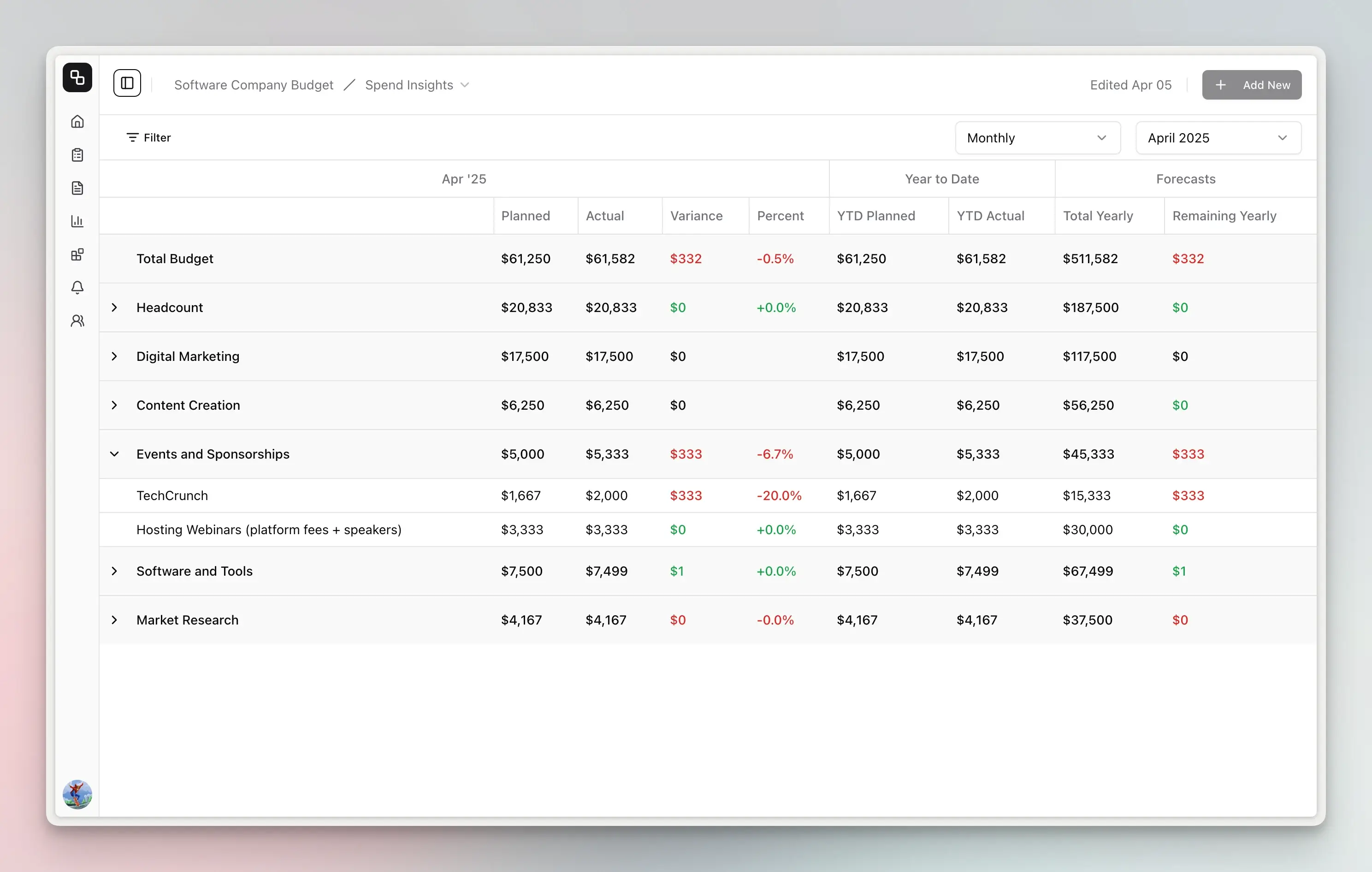
Automatic variance calculations show how you’re performing against plan:
- Monthly variance - Planned vs. actual for each month
- Variance percentage - Percentage over/under budget
- YTD tracking - Year-to-date planned vs. actual accumulation
- Annual forecast - Projected year-end spend based on actuals + remaining planned
- Status indicators - Visual alerts for variances (normal <5%, warning 5-10%, critical >10%)
Visual Budget Dashboard
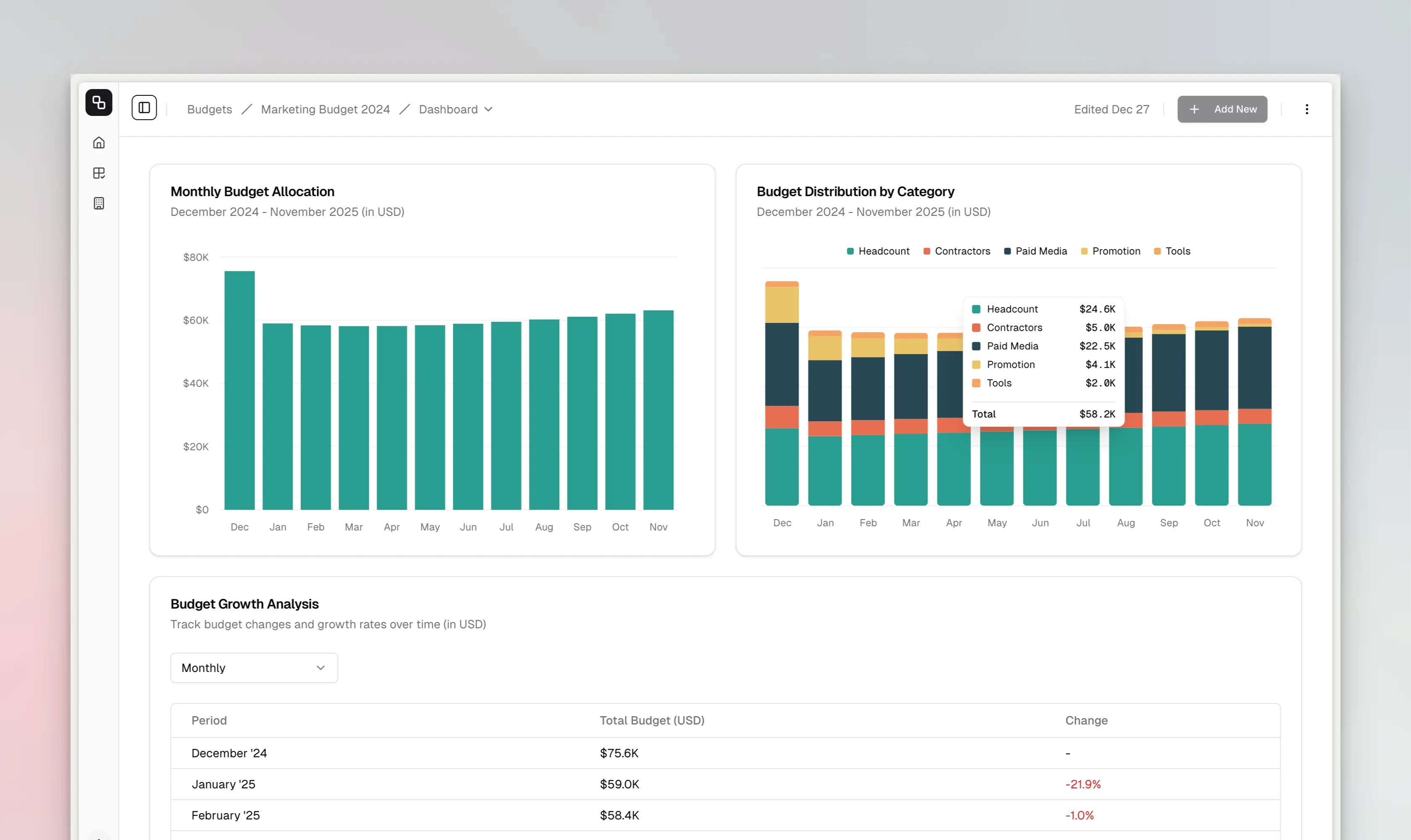
Interactive charts and insights on your home page:
- Monthly allocation trends - See spend distribution over time
- Category breakdown - Pie chart of budget by category
- Growth analysis - Track budget changes period-over-period
- Drill-down capabilities - Click chart elements to explore details
- Configurable views - Monthly, quarterly, or half-yearly aggregations
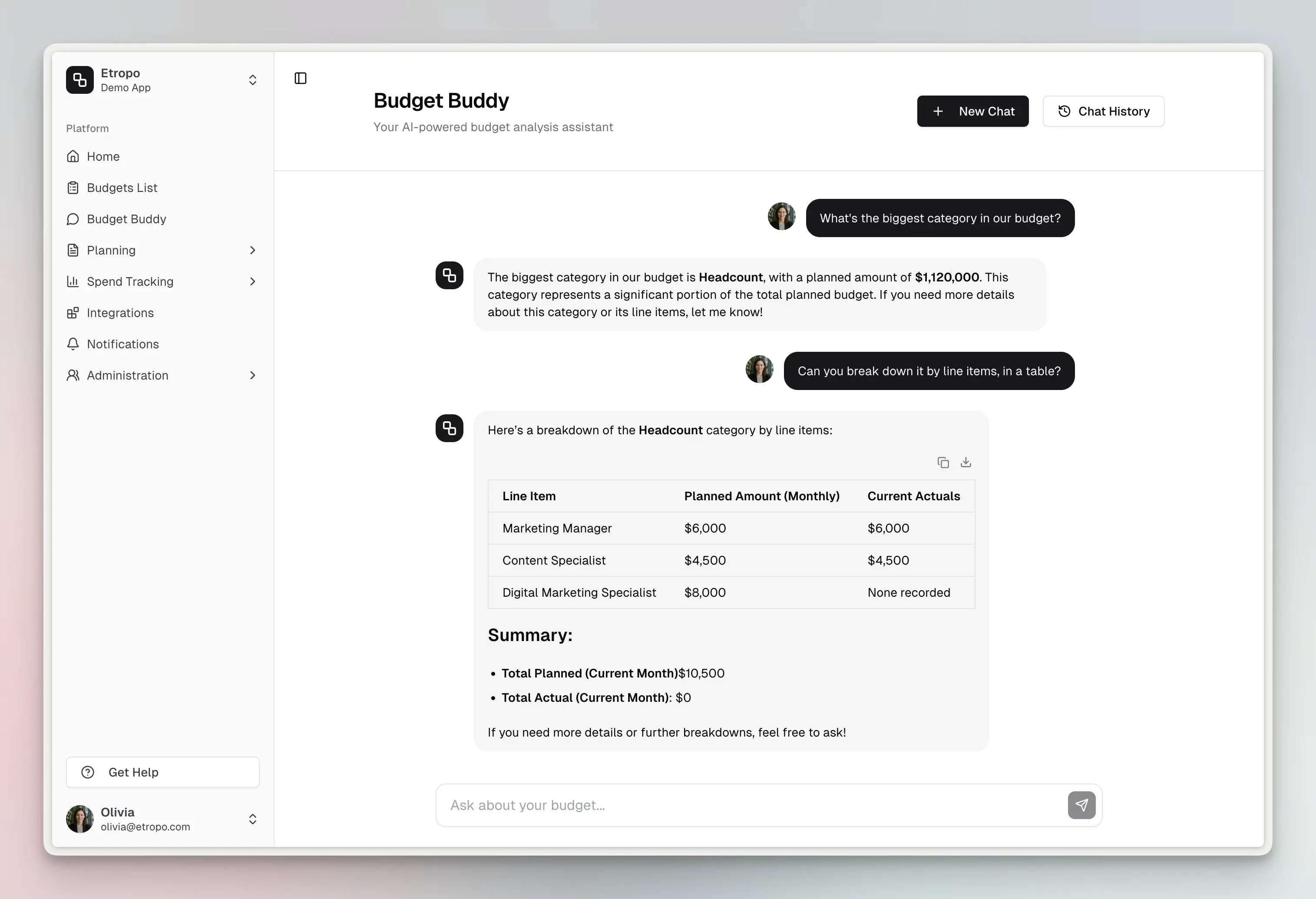
Budget Buddy - AI-Powered Assistant
Your intelligent budget advisor with deep understanding of your specific budget:
What Budget Buddy Can Do:
- Answer natural language questions: “How much did we spend on LinkedIn Ads in Q3?”
- Generate instant reports: “Show me all line items over budget this month”
- Analyze trends: “Which categories have the highest variance?”
- Provide optimization suggestions: “Where can we reallocate budget?”
- Create shareable summaries: “Draft an executive summary of Q4 spending”
How It Works:
- Contextual awareness - Knows your complete budget structure, categories, owners
- Semantic search - Understands questions like “social media advertising” maps to relevant line items
- Multi-step reasoning - Combines data from multiple sources to answer complex questions
- Conversational memory - Remembers previous questions in the chat for follow-up
- Structured outputs - Returns formatted tables, lists, and insights ready to share
Example interactions:
- “What’s our total planned spend for digital marketing in Q1?”
- “Show me which line items are missing actuals for October”
- “Compare our paid search spend this year vs. last year”
- “Which cost center has the most budget variance?”
Powered by advanced AI with custom tools that query your budget data in real-time.
4. Permissions & Access Control
Organization Roles
- Admins - Full budget access, integration management, member management
- Members - Access to assigned categories and line items
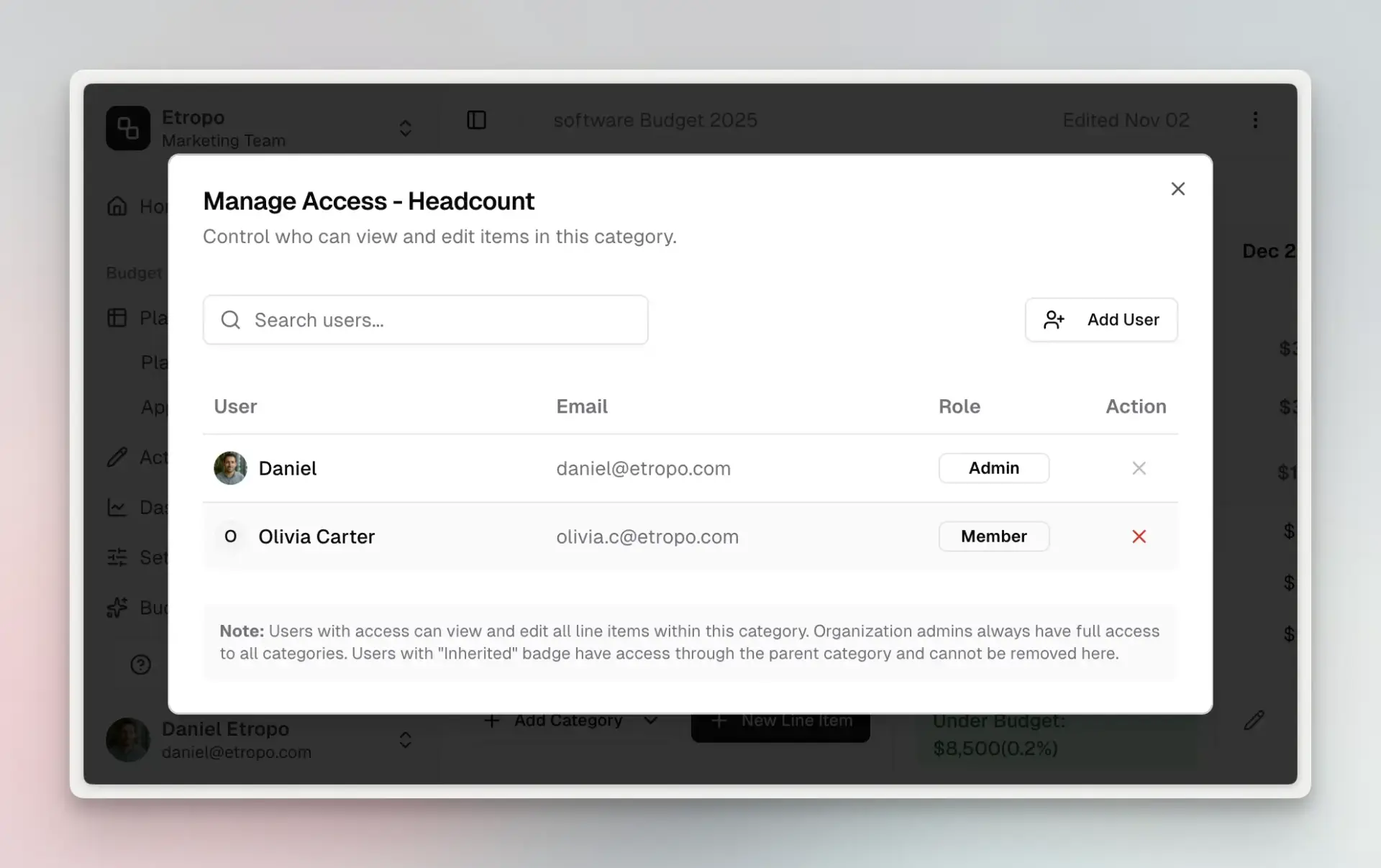
Granular Category Access
Fine-grained control over who sees what:
- Category-level permissions - Grant access to specific categories
- Inherited access - Master category access automatically grants access to child categories
- Line item ownership - Assign owners for specific budget lines
- Bulk access management - Add/remove access for multiple users at once
Why this matters: Share your overall marketing budget with the VP of Marketing while giving individual channel managers access only to their categories. Junior team members can update actuals for their line items without seeing executive compensation budgets.
Access Control in Action
- Budget exports only include line items the user can access
- Dashboard charts filter to accessible data automatically
- Comments visible only on accessible line items
- Integrations respect category access for sync operations
6. Data Export & Reporting
XLSX Export
Instant download of budget data in Excel format:
- Export options - Current view only (Plans OR Actuals) or Both
- Complete structure - Master categories, categories, line items, cost centers, properties
- Monthly columns - All months in budget period
- One-click export - Immediate download, no waiting
Google Sheets Sync
Automated bi-directional sync with Google Sheets:
- Three-tab spreadsheet - Plans, Actuals, and Plans & Actuals Combined
- Daily automated sync - Fresh data every morning
- Manual sync - On-demand refresh with one click
- Live collaboration - Share with Finance team using Google Sheets permissions
- Additional columns - Includes Owner and Currency data (not in XLSX export)
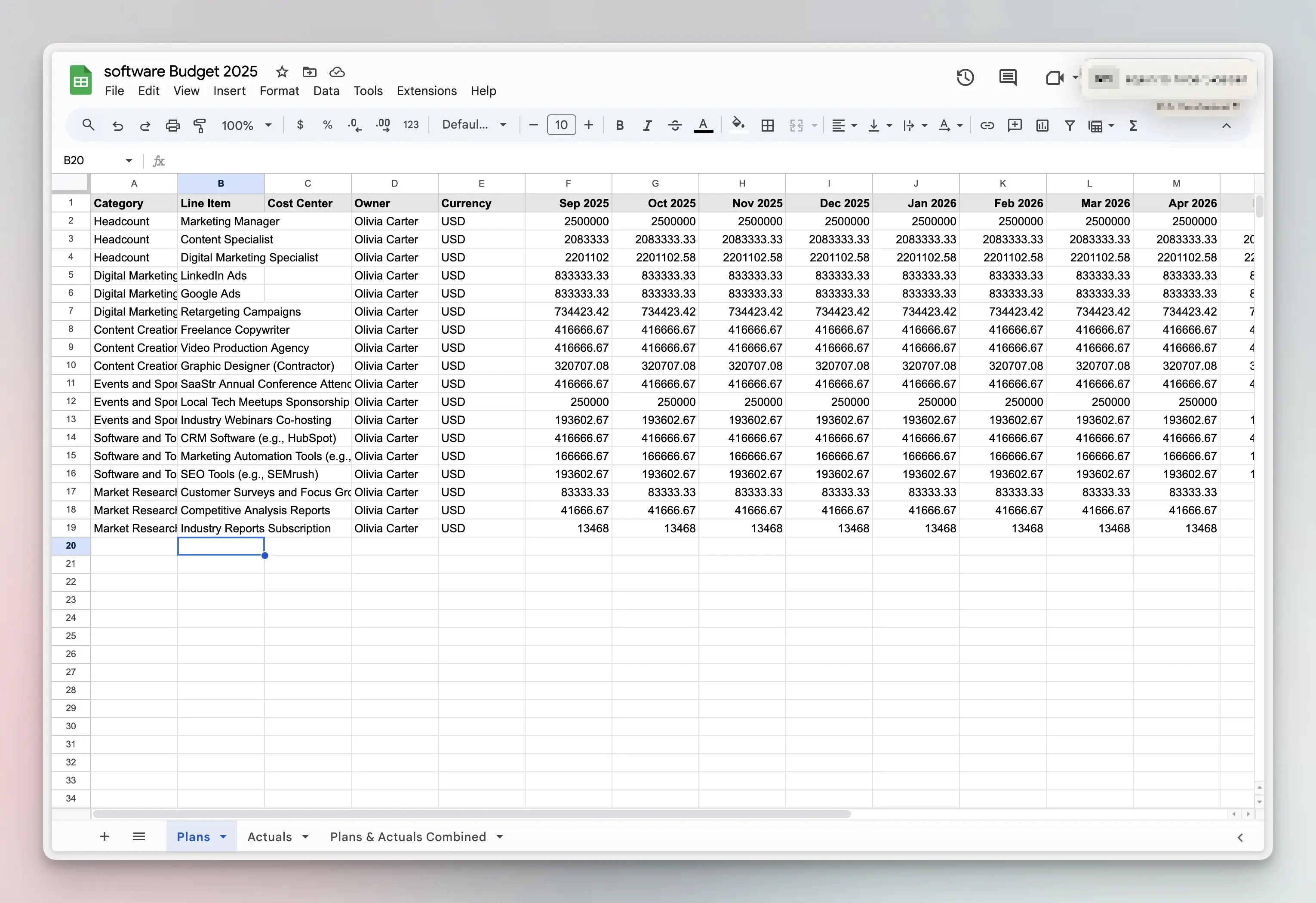
Use case: Finance team requires Google Sheets for their reporting stack. Connect your budget once, and they get fresh data every morning without bothering you.
7. Import Your Existing Budget
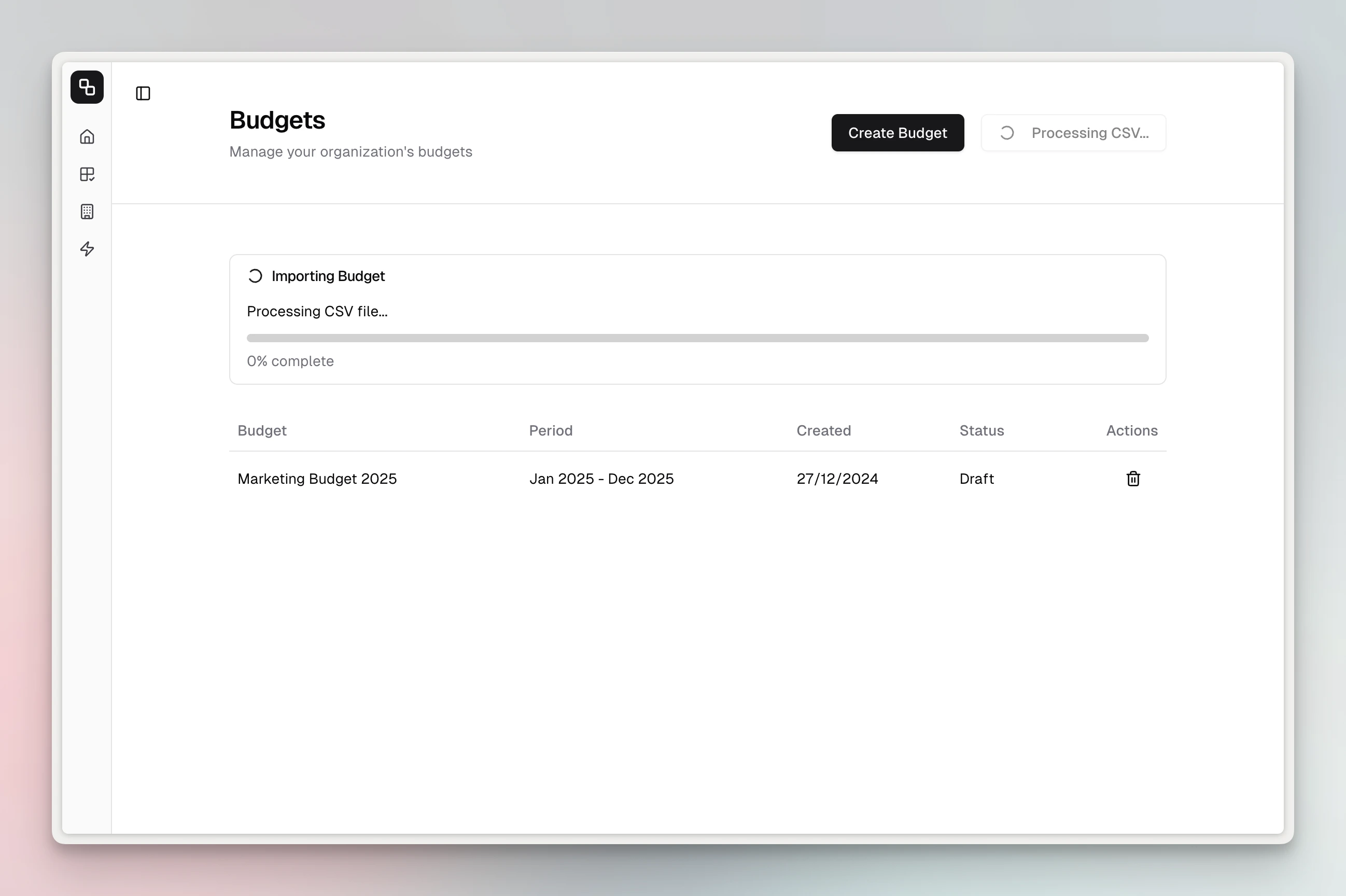
Transform existing spreadsheets into Etropo budgets automatically:
- 60-second import - Upload Excel/CSV and get structured budget
- AI-powered detection - Automatically identifies line items, categories, cost centers
- No manual mapping - System figures out your structure
- Multi-currency support - Handles mixed currencies in import
Subscription Plans & Trial
14-Day Pro Trial
Every new organization automatically receives:
- Full Pro access for 14 days
- No credit card required
- All integrations included
- Unlimited team members
Paid Plans
After trial, choose the plan that fits your needs:
- Essential - Core budgeting features, basic exports
- Pro - All features including integrations, AI assistant, advanced analytics
- Custom - Enterprise features, custom limits, priority support
See pricing page for current pricing.
How Etropo Works: The Planning Cycle
1. Build Your Budget
- Set up organizational defaults (currency, fiscal year)
- Create budget with start and end dates
- Define categories and master categories (if using hierarchical structure)
- Add line items with planned monthly amounts
- Assign owners and cost centers
- Add custom properties as needed
2. Track Actuals
Choose your tracking method:
- Automated - Connect Google Ads, LinkedIn Ads for automatic sync
- Invoice automation - Upload PDFs or forward vendor invoices to unique email address for AI extraction
- Manual entry - Use spreadsheet-like grid for non-integrated spend
- Slack reminders - Get monthly reminders to update actuals
3. Analyze Performance
- Dashboard insights - Visual charts show budget health at a glance
- Variance tracking - Automatic planned vs. actual comparisons
- Budget Buddy AI - Ask questions and get instant analysis
- Export reports - Generate XLSX or sync to Google Sheets
4. Adjust & Optimize
- Reforecast - Update planned amounts based on actual performance
- Reallocate budget - Move budget between categories as priorities shift
- Approval workflows - Submit changes for stakeholder approval
- Comments & collaboration - Discuss changes with team members inline
5. Repeat
- Duplicate for next period - Copy budget structure for next quarter/year
- Refine process - Improve accuracy with each cycle
- Build history - Create trends and year-over-year comparisons
Who Etropo Is For
Primary Users
- Marketing Operations Managers - Centralize and automate budget tracking
- CMOs & VPs of Marketing - Executive visibility into marketing spend
- Finance Business Partners - Collaborate with marketing on budget management
- Performance Marketing Managers - Track paid media ROI and spend pacing
- Marketing Coordinators - Update actuals and manage line item details
Organization Types
- Mid-market companies (50-500 employees) with dedicated marketing teams
- Agencies managing client budgets across multiple accounts
- SaaS companies with complex digital marketing spend
- B2B companies with multi-channel marketing programs
- E-commerce brands with seasonal budget fluctuations
Team Size
- Works for solo marketers managing their own budget
- Scales to large marketing teams (50+ members) with role-based access
Key Differentiators from Spreadsheets
| Challenge | Spreadsheet Approach | Etropo Approach |
|---|---|---|
| Team collaboration | Chase people via email for updates, version conflicts, no single source of truth | Everyone works in one place - team members update their own line items, no chasing required |
| Integrations | Manual copy-paste from ad platforms | Automated weekly sync with Google Ads, LinkedIn |
| Invoice processing | Manually type amounts into cells | Upload or email PDF → AI extraction → one-click confirm |
| Access control | Duplicate files or unhide columns | Granular category-level permissions |
| Variance tracking | Manual formula creation | Automatic calculations with visual indicators |
| Reporting | Rebuild charts manually | Auto-updating dashboard + AI assistant |
| Getting started | Create templates, manage formulas, build structure from scratch | Import in 60 seconds, focus on strategy instead of spreadsheet maintenance |
Common Use Cases
Use Case 1: Digital Marketing Agency
Challenge: Managing 20+ client budgets across Google Ads, Facebook Ads, LinkedIn Ads
Etropo Solution:
- Create separate budget for each client
- Connect all ad accounts with OAuth integrations
- Weekly automated sync pulls latest spend
- Export client-specific reports to Google Sheets
- Share read-only access with clients via category permissions
Result: 15 hours/month saved on manual reporting, 100% accurate spend data
Use Case 2: SaaS Company CMO
Challenge: Quarterly board reports require variance analysis and forecasting
Etropo Solution:
- Hierarchical budget with master categories for board presentation
- Team members update actuals monthly via Slack reminders
- Budget Buddy generates executive summary on-demand
- Export to Google Sheets for Finance team consumption
- Visual dashboard embedded in board deck
Result: Board-ready reports in 10 minutes vs. 4 hours previously
Use Case 3: E-Commerce Brand with Seasonal Spend
Challenge: Budget fluctuates dramatically by season, needs frequent reforecasting
Etropo Solution:
- Monthly budget reviews using Plans Updater view
- Real-time variance tracking shows when to adjust
- Invoice automation captures vendor bills instantly
- Budget duplication for yearly planning iterations
- Cost center tracking for product line attribution
Result: 3-day close process vs. 10 days with spreadsheets
Getting Started
Ready to transform your marketing budget management?
Quick Start (3 Steps)
- Sign up - Create your account (takes 60 seconds)
- Choose your path:
- Import existing budget - Upload your spreadsheet and start in 60 seconds
- Create new budget - Build from scratch with guided setup
- Start tracking - Connect integrations or enter actuals manually
Your 14-day Pro Trial starts immediately - no credit card required.
Frequently Asked Questions
How is Etropo different from my spreadsheet?
The short answer: Etropo is purpose-built software for marketing budget workflows. Spreadsheets are general-purpose tools that require constant manual work.
Key differences:
- Automated integrations - Etropo syncs spend data from Google Ads, LinkedIn, etc. automatically
- Real-time collaboration - Multiple users can work simultaneously without version conflicts
- Granular permissions - Share budgets without exposing confidential line items
- AI assistant - Budget Buddy answers questions about your spend instantly
- Invoice automation - Upload or email PDFs for AI extraction and matching
- Approval workflows - Built-in approval board vs. email chains
- Complete audit trail - See who changed what, when
What exactly does Etropo do?
Etropo is marketing budget software that handles three core functions:
- Planning - Create budgets organized by categories and line items with monthly planned amounts
- Tracking - Automatically sync actual spend from ad platforms, invoices, or manual entry
- Analysis - Compare planned vs. actual with variance calculations, dashboards, and AI insights
It replaces spreadsheet-based budget management with a collaborative platform built specifically for marketing teams.
What’s the pricing?
Transparent, self-service pricing:
- 14-day Pro Trial - Free, no credit card required
- Essential Plan - Core budgeting features
- Pro Plan - All features included
- Custom Plan - Enterprise features and priority support
See pricing page for current pricing.
No per-seat pricing - Invite unlimited team members on any plan.
Do you offer a free trial?
Yes! Every new organization gets a 14-day Pro Trial with:
- ✅ All Pro features unlocked
- ✅ All integrations available
- ✅ Unlimited team members
- ✅ No credit card required
- ✅ No auto-charges when trial ends
Start your trial: Sign up here
Can I export my data from Etropo?
Absolutely. You own your data and can export anytime:
XLSX Export:
- Download Excel files instantly
- Choose Plans, Actuals, or Both
- Includes all budget structure and metadata
Google Sheets Export:
- Automated daily sync to Google Sheets
- Three tabs: Plans, Actuals, Combined
- Manual sync available anytime
CSV Export:
- Available for all budget data
- Standard format for importing elsewhere
No lock-in - Export everything and cancel anytime if needed.
Does Etropo support multiple currencies?
Yes. Full multi-currency support:
- Set organizational default currency
- Assign different currencies to individual line items
- Define custom exchange rates
- Automatic currency conversion for variance calculations
- Multi-currency totals in range selections
- Currency column in exports
Example: You can have line items in USD, EUR, and GBP in the same budget, and Etropo will normalize everything for variance analysis.
Should I invite my marketing team to Etropo?
Absolutely! Etropo is designed for team collaboration:
Benefits of inviting team members:
- Line item owners can update their own actuals
- Comments enable inline discussions
- Approval workflows involve relevant stakeholders
- Each person sees only their accessible categories (no data leakage)
- Slack reminders notify individuals when actuals are due
No per-seat fees - Add unlimited team members on any plan.
Access control: Set granular permissions so junior team members only see their line items while execs see everything.
What integrations does Etropo offer?
- Google Ads - Weekly automated sync, multiple accounts, historical import
- LinkedIn Ads - Weekly sync, campaign mapping, historical data
- Google Sheets - Daily two-way sync for Finance collaboration
- Slack - Monthly actuals reminders and one-click updates
- Invoice Automation - Upload or forward PDFs for AI-powered extraction and matching
How long does it take to set up?
Most teams have their complete budget structure operational within one day - from uploading your spreadsheet to connecting integrations and inviting team members. No complex setup or IT involvement required.
Is my data secure?
Yes. Etropo is built on SOC 2 Type II compliant infrastructure with end-to-end encryption. See etropo.com/security for full details.
Can I try Etropo for free before committing?
Yes! The 14-day Pro Trial is specifically designed for this:
- Import your existing budget
- Connect your ad accounts to see automated sync
- Invite a few team members to test collaboration
- Generate reports and use AI assistant
- No credit card required, no commitment
Ready to stop wrestling with spreadsheets? Start your 14-day Pro Trial →