Marketing Spend Tracking
This guide covers all the ways to track actual spend in Etropo — from manual entry in the budget editor to automated syncs, AI-powered updates, and team coordination via Slack.
Actuals Editor
The Actuals Editor is where you record and manage your actual marketing spend.

Basic Usage
To update actual spend values:
- Navigate to your budget
- Switch to the “Actuals Editor” view from the header dropdown
- Find the line item and month you want to update
- Click on the cell and enter the actual amount spent
- Press Enter or click outside the cell to save
Typed Actuals vs. Derived Actuals
There are two ways a month’s actual gets its value:
- Typed in — you enter the number directly in the cell, as above
- Derived from expenses — you record individual dated expenses under the line item, and Etropo sums them per month
Once a month has expenses, its actual is derived and the cell locks — a receipt icon appears, and clicking it opens the expenses behind the number. Remove every expense from that month and the cell unlocks for normal editing again.
Cells on line items mapped to an ad platform lock too, because the daily sync owns those values.
Locked cells are skipped by paste, fill, clear and multi-cell edits, so bulk operations never overwrite a derived or synced value.
Actuals Are Shared Across Versions
If your budget has more than one version, your actual spend is shared by all of them. The same figures appear in every version, whether they came from manual entry, invoices, or an ad platform sync — and editing an actual in one version updates it everywhere.
That means a draft reforecast shows your real spend from day one, and switching which version is active never moves or duplicates a single actual. Only the planned amounts differ between versions.
Missing Actuals Overview
As an admin with an active budget, you can quickly identify missing actuals from your team members directly from the home page. The home section displays information about actuals that haven’t been submitted by teammates for the last 3 months.
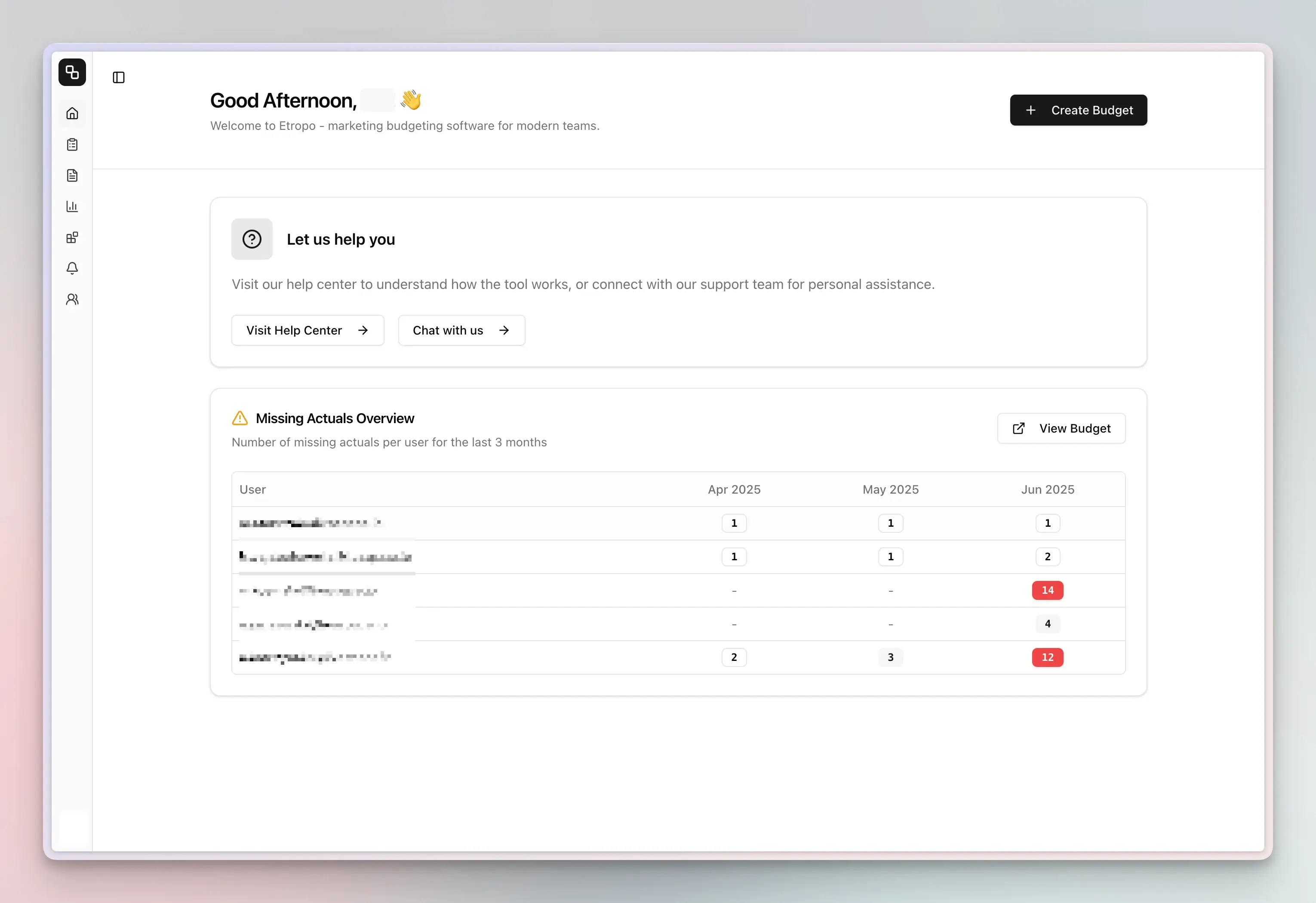
This overview allows you to:
- See which team members have pending actuals submissions
- Identify which months are missing data
- Take quick action to follow up with teammates
- Maintain complete budget tracking without manual checking
Automating Actuals Collection
Expenses
Record what you spent as individual dated expenses under a line item, and Etropo derives the monthly actual from them. Confirmed invoices become expenses too, so a month’s actual always comes with the breakdown that explains it.
Key Features:
- Dated expenses with amounts and descriptions, grouped by month
- Monthly totals become your actuals automatically
- Negative amounts for credits, refunds and corrections
- Confirmed invoices appear as expenses; rejecting an invoice removes it again
For detailed information, see our Expenses guide.
Invoice Automation
Automate invoice processing by forwarding PDF invoices to your organization’s unique email address. The system extracts details, matches them to budget line items, and updates actuals automatically.
Key Features:
- Forward invoices via email for automatic processing
- AI-powered matching to budget line items
- Choose between monthly or yearly expense allocation
- Email notifications for invoice senders and reviewers
For detailed information, see our Invoice Automation guide.
Email Notifications
Receive automated monthly reminders directly to your inbox when actuals need to be updated. Email notifications provide a simple, organization-wide solution that admins can enable with a single toggle.
Key Features:
- Automated monthly reminders on the 28th of each month
- Centralized admin control for entire organization
- Works alongside or instead of Slack notifications
- No individual setup required
For detailed information, see our Email Notifications guide.
Slack
The Slack integration collects actuals from your team automatically. Team members get reminders when actuals are due and can update their line items directly from Slack. Budget Buddy AI is also available in Slack — team members can update actuals by telling it what changed in natural language.
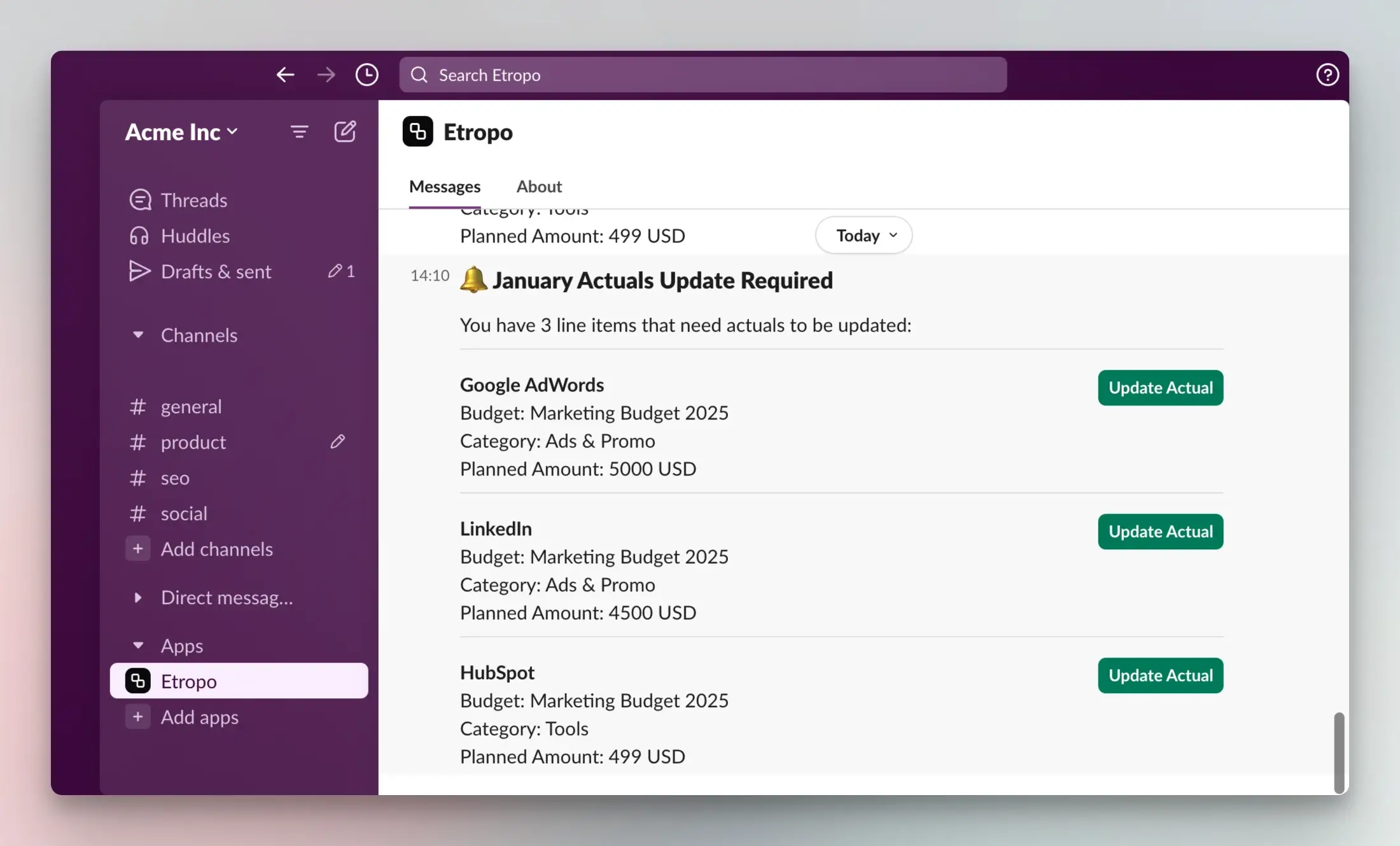
For setup instructions, see the Slack Integration guide.
Budget Buddy, Claude, ChatGPT & Other AI Agents
You can update actuals through AI instead of editing cells manually:
- Budget Buddy (in-app or Slack) — “Update January actuals for the SaaStr conference: booth $12,500, speaker package $4,800, travel $2,750”
- Claude, ChatGPT & other AI agents (via MCP) — Connect Etropo and update actuals from any AI assistant
Budget Buddy and MCP-connected agents can update multiple line items in a single step and will confirm changes before applying them.
Months backed by expenses and line items synced from an ad platform are skipped — AI tells you which ones and why, and applies the rest of the request as usual.
Ad Platform Integrations
Etropo syncs actual spend daily from your ad accounts:
- Google Ads — Daily sync with multiple account support and up to 12 months historical import. See Google Ads guide
- LinkedIn Ads — Daily sync with campaign mapping. See LinkedIn Ads guide
- Meta Ads — Daily sync for Facebook and Instagram ad accounts. See Meta Ads guide
Working with Actuals Data
Actuals vs. Plans
The Budget Editor has different viewing modes:
- Actuals Editor — View and edit actual spend values
- Plans Editor — View and edit planned values
- Plans & Actuals — See both side by side to adjust future plans based on actual performance (available for active budgets)
Variance Analysis
Etropo automatically calculates variance between planned and actual spend. See Spend Insights for details on variance tracking and visual breakdowns.